How to use Google Plus Hangouts, On Air with a YouTube Channel to Live Broadcast and Podcast Instantly
Recently I've been looking at publishing platforms online including multimedia audio and video streaming.
As a start up entrepreneur I'm always trying to stay on top of the latest tools and tech available. As a creative whose medium is the Internet, it's important to know the evolving capabilities and tools available.
With bandwidth and device connectivity improving, rich multimedia and collaborative applications are beginning to gain adoption.
It's worth taking a moment to review the state of live video streaming on the Internet. It looks mostly the same as a few years ago with ustream.tv, livestream.com & justin.tv sitting at the top.
However, YouTube is finally offering a product to consumers for free! I guess this is old news but I don't think they've made it obvious or easy for users to find. Thus, I thought this post might document my current experience testing out the platform. To my surprise, I've also seen it work on a mobile iPhone, and they just announced paid channels.
The purpose and motive of my exploration into these publishing platforms is my desire to create. You have to know the medium exists before you can express yourself through it.
With that said, I hope this gives you confidence to try it out and see what's possible.
For the Smoking Hot Coffee show, we've been using hangouts in favor to Skype because of the price and ease of use. We can quickly and easily get more than two people chatting, screen sharing and recorded.
In my pursuits of open source, documenting my life, and generally blogging more, I've tested out what hangouts can do for live coding.

Now I see people using this to do things like streaming video games, sporting events, news & politics, howto's, pet cams and more. Ultimately the creativity of the content is up to you. Early on YouTube live streams seemed limited to the White House or Coachella, but now with Google Plus Hangouts, you can publish your thoughts and screencast in minutes without any software or downloads.
When I realized that it wasn't intuitive what I could do using all of these tools, Google's Plus Hangouts, with live streaming and auto publishing to YouTube, I decided to document the state of this tech.
There's no better way than to demonstrate and show the tool itself. If you're reading this, hopefully you can watch the attached video I'm going to quickly demo publishing a screencast with no downloads or software via YouTube.
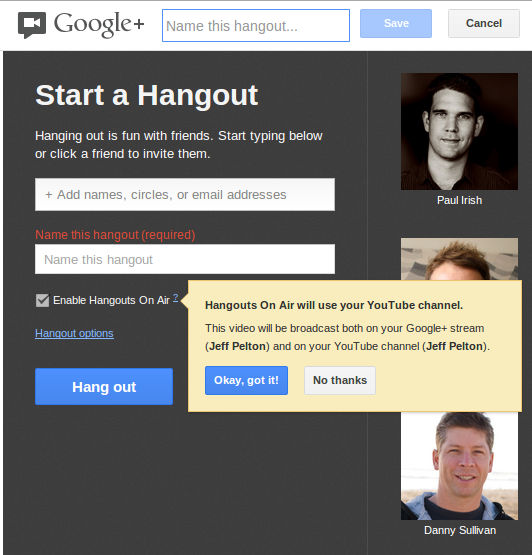
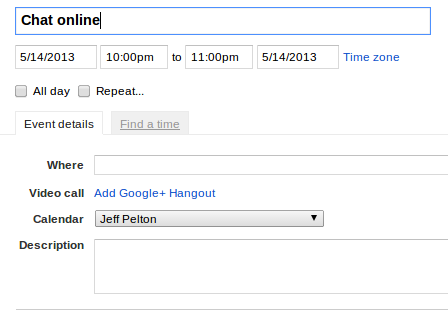
The things I struggled with the most were understanding how all of these things fit together: Google Plus, Hangouts, On Air (streaming) & YouTube. It's easier to show than tell, but there's many ways to start a hangout, but you have to do it from plus.google.com to check the "on air" option which streams the hangout to a normal YouTube embed player, but also publishes the live stream as an uploaded video in your YouTube account. Unfortunately I wasn't able to achieve this when attaching the hangout link via GMail's Calendar.
You can invite your "circles" to the hangout and I suppose they might get notified about it. Also I think it's only mutually circled "friends". Otherwise, only those you invite can join in to participate in the hangout, and those who are just watching it live, can comment on the video like a normal clip.
Once you've given it a shot, you can start to play with the screen sharing and dream up the great ways that you can quickly collaborate and publish interesting content - quickly.
As a start up entrepreneur I'm always trying to stay on top of the latest tools and tech available. As a creative whose medium is the Internet, it's important to know the evolving capabilities and tools available.
With bandwidth and device connectivity improving, rich multimedia and collaborative applications are beginning to gain adoption.
It's worth taking a moment to review the state of live video streaming on the Internet. It looks mostly the same as a few years ago with ustream.tv, livestream.com & justin.tv sitting at the top.
However, YouTube is finally offering a product to consumers for free! I guess this is old news but I don't think they've made it obvious or easy for users to find. Thus, I thought this post might document my current experience testing out the platform. To my surprise, I've also seen it work on a mobile iPhone, and they just announced paid channels.
The purpose and motive of my exploration into these publishing platforms is my desire to create. You have to know the medium exists before you can express yourself through it.
With that said, I hope this gives you confidence to try it out and see what's possible.
For the Smoking Hot Coffee show, we've been using hangouts in favor to Skype because of the price and ease of use. We can quickly and easily get more than two people chatting, screen sharing and recorded.
In my pursuits of open source, documenting my life, and generally blogging more, I've tested out what hangouts can do for live coding.
Now I see people using this to do things like streaming video games, sporting events, news & politics, howto's, pet cams and more. Ultimately the creativity of the content is up to you. Early on YouTube live streams seemed limited to the White House or Coachella, but now with Google Plus Hangouts, you can publish your thoughts and screencast in minutes without any software or downloads.
When I realized that it wasn't intuitive what I could do using all of these tools, Google's Plus Hangouts, with live streaming and auto publishing to YouTube, I decided to document the state of this tech.
There's no better way than to demonstrate and show the tool itself. If you're reading this, hopefully you can watch the attached video I'm going to quickly demo publishing a screencast with no downloads or software via YouTube.
The things I struggled with the most were understanding how all of these things fit together: Google Plus, Hangouts, On Air (streaming) & YouTube. It's easier to show than tell, but there's many ways to start a hangout, but you have to do it from plus.google.com to check the "on air" option which streams the hangout to a normal YouTube embed player, but also publishes the live stream as an uploaded video in your YouTube account. Unfortunately I wasn't able to achieve this when attaching the hangout link via GMail's Calendar.
You can invite your "circles" to the hangout and I suppose they might get notified about it. Also I think it's only mutually circled "friends". Otherwise, only those you invite can join in to participate in the hangout, and those who are just watching it live, can comment on the video like a normal clip.
Once you've given it a shot, you can start to play with the screen sharing and dream up the great ways that you can quickly collaborate and publish interesting content - quickly.